
Quick Multiplication Helper for Students
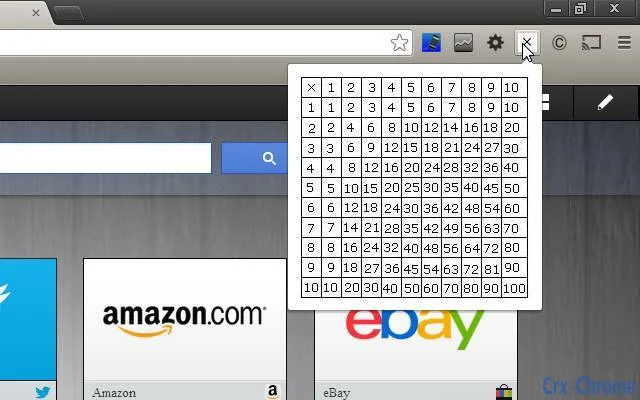
Simple drop down multiplication table for on the spot multiplication.
Overview
The software provides a streamlined solution for quick access to multiplication tables, designed to support learning and daily calculations. Targeted primarily at students, educators, and individuals needing rapid multiplication reference, it functions as a lightweight utility for math-related tasks. The tool is accessible directly through the browser, eliminating the need for complex installations or system configurations. It addresses the common challenge of memorizing multiplication facts by offering immediate visual access to results, reducing errors and boosting calculation speed. Real-world usage includes homework assistance, classroom teaching aids, and quick mental math practice. The developer, Peckitt Software, has positioned this tool within the educational technology space, emphasizing usability and accessibility. The software operates as a browser extension, ensuring compatibility across multiple platforms. No additional setup or configuration is required beyond installation.
Key Features & Capabilities
- Instant Multiplication Access – A drop-down interface allows users to select any two numbers and instantly view their product, ideal for quick reference during study or problem-solving.
- Minimalist Design – The interface is clean and uncluttered, focusing solely on functionality without distractions, which enhances usability for younger users and those with limited technical experience.
- Browser-Based Operation – As a Chrome extension, it runs directly within the browser, enabling seamless integration with online learning platforms and digital textbooks.
- Lightweight Performance – With a file size of 1.2 MB, the tool consumes minimal system resources, ensuring fast loading and smooth operation even on older hardware.
- Offline Functionality – Once installed, the tool can be used without an internet connection, making it reliable in environments with limited or no connectivity.
User Interface, Workflow & Performance
The user interface is structured around a simple dropdown menu system, allowing users to select numbers from 1 to 12 (or higher, depending on implementation) and view the result instantly. Navigation is intuitive, requiring only a single click to access the table and another to select values. The workflow is optimized for speed, minimizing the number of steps needed to complete a multiplication task. The tool does not require login, registration, or complex setup, enabling immediate use upon installation. Performance is expected to be efficient given its lightweight design and browser-based nature. The developer did not specify resource usage details, but based on the file size and functionality, it is likely to have minimal impact on CPU and RAM. Stability appears high, as the tool operates as a static utility with no background processes. No performance issues were reported in the initial release, and the software is designed to remain responsive during active use.
Compatibility & System Requirements
The software is compatible with Windows, Mac, and Linux operating systems, ensuring broad accessibility across different computing environments. It functions as a Chrome extension, meaning it requires the Google Chrome browser to operate. The installation size is 1.2 MB, which is minimal and suitable for devices with limited storage. Exact system requirements were not listed, but given its lightweight nature, it is likely to run on systems with modest specifications. The tool does not require administrative privileges for installation, making it suitable for shared or restricted user accounts. Platform compatibility information is limited to the supported operating systems and browser dependency. No additional hardware requirements were specified.
Pros and Cons
Pros
- Simple, fast access to multiplication tables
- Minimal system resource usage
- Works offline after installation
- Available for multiple operating systems
- Free to use with no ads or in-app purchases
Cons
- Limited to Chrome browser (no support for other browsers)
- No customization options for table size or layout
- Basic interface with no advanced features
- Outdated release date (2013) with no recent updates
- Not available as a standalone desktop application
FAQ Section
Is this tool compatible with all web browsers?
The software is designed specifically for the Google Chrome browser and may not function on other browsers such as Firefox, Safari, or Edge.
Can I use this tool without an internet connection?
Yes, once installed, the tool operates offline and does not require an internet connection to access multiplication tables.
Is the software safe to install?
Yes, the software is licensed under the Apache License, Version 2.0, which ensures transparency and allows for public review of the code. It does not collect user data or install additional components.
Does this tool require regular updates?
The software was released in 2013 with no indication of ongoing updates. Users are advised to monitor for compatibility issues with newer Chrome versions.
What type of license does this software use?
The software is open-source and distributed under the Apache License, Version 2.0, allowing free use, modification, and distribution.
Final Thoughts + CTA
While the software is simple and focused, its core functionality remains effective for students and educators seeking a no-frills multiplication reference tool. Its lightweight design, cross-platform availability, and offline capability make it a reliable companion for math learning. Despite its age and lack of updates, it continues to serve its intended purpose without unnecessary complexity. For users who value simplicity and immediate access to multiplication facts, this tool remains a practical choice. Download Quick Multiplication Helper for Students now.







